
2. Jupyter Notebooks#
Python programs (.py files) are widely used in data analysis pipelines and software development projects that require
a more structured approach. In this course, however, we will be using mainly Jupyter Notebooks to write our code.
Jupyter Notebooks are a Python way of doing literate programming, that is, incorporating natural language, e.g., English with your source code. So rather than having a word processing document containing all your text, and a .py file containing your source code, Jupyter Notebooks combines functionality of both into one document. A Jupyter Notebook is a web application to make our analysis/code reproducible, one of the qualities that are being promoted in research to be compliant with FAIR standards (Finadble Accessible Interoperable and Reproducible).
The name Jupyter is a play on Jupyter’s core programming languages: Julia, Python, R. The circles in the Jupyter logo are attributed to the Galileo’s moons of Jupiter discovery.

Fig. 2.1 Jupyter logo. Image from jupyter.org.#
Jupyter Notebooks support different programming languages. Each programming language has a kernel which executes the code cells
in the Jupyter Notebook. For Python, the kernel is called IPython. A Jupyter Notebook has an .ipynb extension which
stands for IPython Notebook.
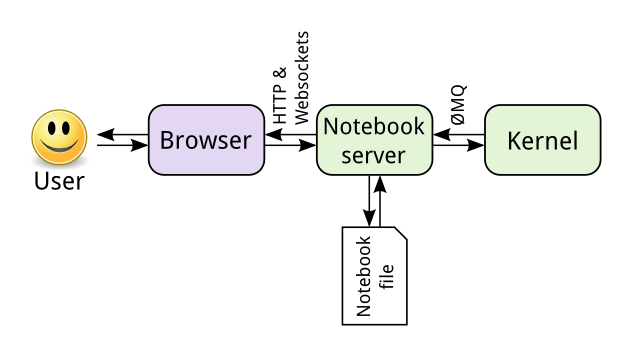
Fig. 2.2 The different components of the Jupyter ecosystem that enable execution of a Jupyter Notebook [1].#
Fig. 2.2 shows the different components that interact with a Jupyter Notebook file and process it to be displayed in a web browser. The Jupyter Notebook file, kernel and browser communicate together via the Jupyter Notebook Server.