
3.6. The GitHub flow#
A better way of describing the process above is via the GitHub workflow. There are several different workflows, e.g.,
git-flow, GitHub flow and GitLab flow. It is not the scope of this course to get into details about the different
software development versioning models. However, we will look briefly at GitHub flow which is one of the simple
workflows available, with the aim to understand the basic constructs of software development versioning models so that
we can adopt good practices when sharing code or working in teams. The main rule of the GitHub flow is that anything in
the main branch is deployable. The main branch is the central branch which reflects what is deployed. Therefore,
the main branch should always be in a ready state and stable.
The GitHub flow steps consist of the following:
Create a branch: If you want to make changes to the files present in the
mainbranch, you will need to create a new branch off of themainbranch; we will refer to this as afeaturebranch. Name thisfeaturebranch with a descriptive name that reflects the change that you would like to do e.g.fix-issue1,add-chapter1. By creating a newfeaturebranch off themainbranch, you can safely do any changes you want without worrying of breaking themainbranch. When you create a branch from yourmainbranch, you’re creating a copy of themainrepository where you can add your new features or try out new ideas without effecting themainrepository.Make changes to the files and then commit to the
featurebranch. Adding commits to thefeaturebranch is important as it keeps track of the updates that you do to your files and also the reason why they were made (make sure you write clear commit messages). The creation of afeaturebranch allows us to keep track of any changes that are done and compare the difference between themainand thefeaturebranch. In this way you can have multiple people working on different things at the same time as you have a stablemainbranch and all the other existent branches are fixes or updates that are work-in-progress to the project. Committing changes to thefeaturebranch is also important as it helps you back up your work in case of a system failure or loss.Open a pull request: Once you have tested the changes you have applied on your code to make sure that everything is running well and you are happy with the changes/commits done on the
featurebranch, the next step is to propose these changes to be submitted into themainbranch for someone to review your work. This is done by creating a * pull request*. You can use the@mentionsystem on GitHub to bring this to attention to specific people.Discussion and review: The whole idea is that when you create a new pull request, this will enable a process of discussion and feedback about the changes being proposed back and forth between the developers of the
mainbranch and yourself (the person that created the pull request). If you need to make additional changes to yourfeaturebranch after discussion, you can commit the changes to thefeaturebranch again and then push the change. Pull requests can be written in Markdown so you can easily add images and other markdown formatting.Merge: Now that the code and files you have committed have passed all your testing, you can merge the changes to the existing
mainrepository so that now they form part of themainrepository. The good thing about all this process is that all the changes made during this process are preserved and anyone can track changes made in each merge and why they were made.
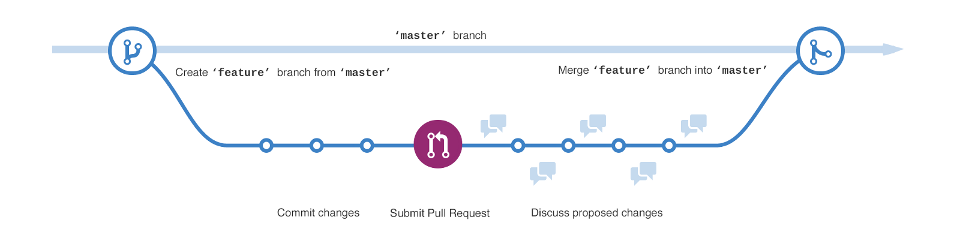
GitHub flow. Please note that master in the image is now referred to as main. Image by GitHub.#
(Exercise 3.6: GitHub flow in action)
Level:
In this exercise we will be going over the GitHub flow in action. We will fix the issue that we have opened in the issue exercise
We will do this by creating a feature branch that will hold the changes related to fixing this issue. A pull
request will be then sent to inform which changes in the feature branch are ready. These changes are then merged into
the main branch.
Please follow the step-by-step instructions of the GitHub flow below. Please click on the forward arrows to go through the instructions one step at a time. Click on the three vertical dots to enter in full screen mode to see the slides better.