
3.5. Creating a branch#
So far we have been working directly on the main branch of our repository as by default a repository has one branch
named main. A branch is a separate version of the main repository. The main branch is considered as the stable
version of the code that you are working on. If you want to add a new feature or additions to your code, having a
separate branch to work on is considered good practice as it will retain a stable version of your code in the main
branch, while developing the new feature in a separate branch. The edits done in the feature branches will not show up
in the main branch until they are merged into the main branch.
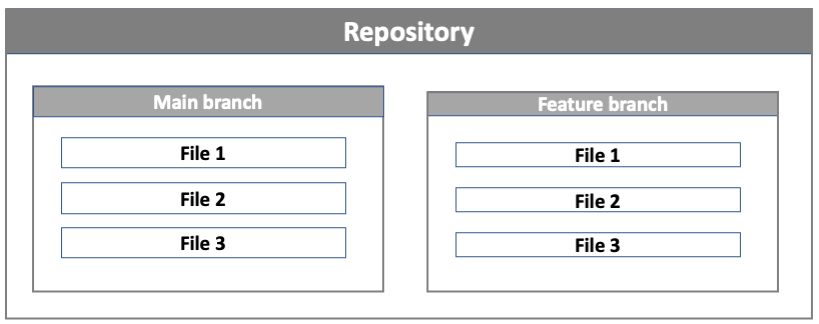
Representation of a main and feature branch. When creating a new branch off the main branch, the new feature branch will be a copy of the main branch at that point in time.#
The figure above shows an example of how feature branches are used in development. In the example below, the main
repository contains 4 files. Developer 1 creates a feature branch feature-1 from the main branch. They make changes
to file 1 and file 3 and merge these changes to the main branch. While developer 1 was working in the feature-1
branch, developer 2 also created a feature branch feature-2 from the main branch. They worked on files 2 and 4 and
merged their changes back into the main branch. At the end of the process, the main branch contains all the changes
from the feature-1 and feature-2 branch. The feature branches created by the two separate developers show how
feature branches facilitate development from multiple developers concurrently.
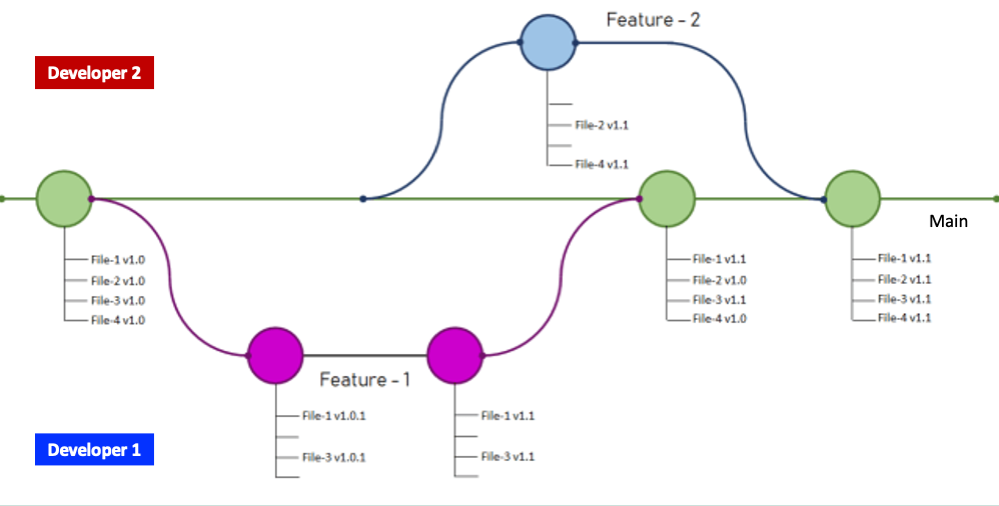
Creation of feature branches and merging into main. Image is an adaptation of the image from Prabhu Vingnesh Kimar Rajagopal.#